Scheduling software for social mediation
Organise drop-in sessions, outreach visits and workshops with PlanningPME

- The sector: local support services… both office-based and mobile
- Why scheduling is a “core” area of work for mediators
- 8 benefits of PlanningPME for your mediation teams
- What PlanningPME specifically offers social mediation organisations
- Comparison table: spreadsheet vs paper chart vs PlanningPME
- 3 practical examples of how to use the schedule in your daily work
- Set up PlanningPME without adding to your workload
- Scheduling that protects the service… and the team
- Customers case studies - Testimonials
- FAQ

In a nutshell
In an organisation for social mediation and access to public services (such as a reception counter, mobile teams, transport mediation or IT workshops), the schedule is not “just” a timetable: it is the tool that ensures service user reception, continuity of service and the quality of support provided. Between multi-site duty rosters, outreach visits, group workshops, travel time, absences and qualifications, planning can quickly become complicated. Staff members (mediators, coordinators, contact persons) need a clear, shared and reliable schedule that can be accessed on site.
The sector: local support services… both office-based and mobile
Mediation centres offer personalised support, free of charge and often without the need for an appointment, at a fixed location or on a mobile basis, with access to digital facilities where available. They enable the staff to handle a wide range of matters (tax, employment, pensions, ID, etc.), thanks to a network of national partners. In social mediation, the aim is also to strengthen social cohesion, ensure access to rights, and prevent and manage everyday tensions and conflicts.
Direct consequence for the teams : A typical day involves a mix of reception duties, administrative support, digital support, group activities, and occasionally transport support (bus/rail), with a significant number of unexpected events.Why scheduling is a “core” area of work for mediators
In this sector, effective planning must take account of very specific constraints:
- A broad range of activities and services : drop-in sessions, support for service providers (e.g. public finance), individual and group IT workshops, conflict prevention initiatives, themed events (mobility, eco-friendly practices, etc.).
- Diversity of service users : young people, older adults, working individuals, people on reintegration schemes, and people with disabilities… (requiring strong interpersonal skills and an adaptable approach).
- Working across multiple locations : the same employee may work at a reception point, then at a field outreach stop, followed by a workshop.
- Unavoidable time costs : travelling, coordination, meetings, data entry, mentoring/training.
- Qualifications and skills : Certain roles require qualifications and/or specific skills.
- Absences that need to be accommodated without disrupting services: holidays, sick leave, time off in lieu, and training.
A spreadsheet might work… until the team grows, the number of field work increases, and replacement staff need to be found and managed rapidly.
8 benefits of PlanningPME for your mediation teams
- Centralised view of multiple sites and mobile teams : who is where, at what time, and what kind of action.
- Scheduling based on skills/qualifications : assign the right people to the right shifts (skills management available in PlanningPME Web Access).
- Management of vehicles : When planning a field team, book a vehicle at the same time to avoid booking conflicts.
- Visualising invisible time costs : travelling, coordination, data entry – for a realistic schedule.
- Recurrent activities : set up recurring schedules (weekly/monthly) and only amend the exceptions.
- User access rights : Each user sees only the relevant information
- Reporting + export to Excel : extract data and create dashboards (export/synchronisation with Excel).
- Online access & calendar synchronisation : remote access, with the option to synchronise with Google Calendar depending on your settings.
What PlanningPME specifically offers social mediation organisations
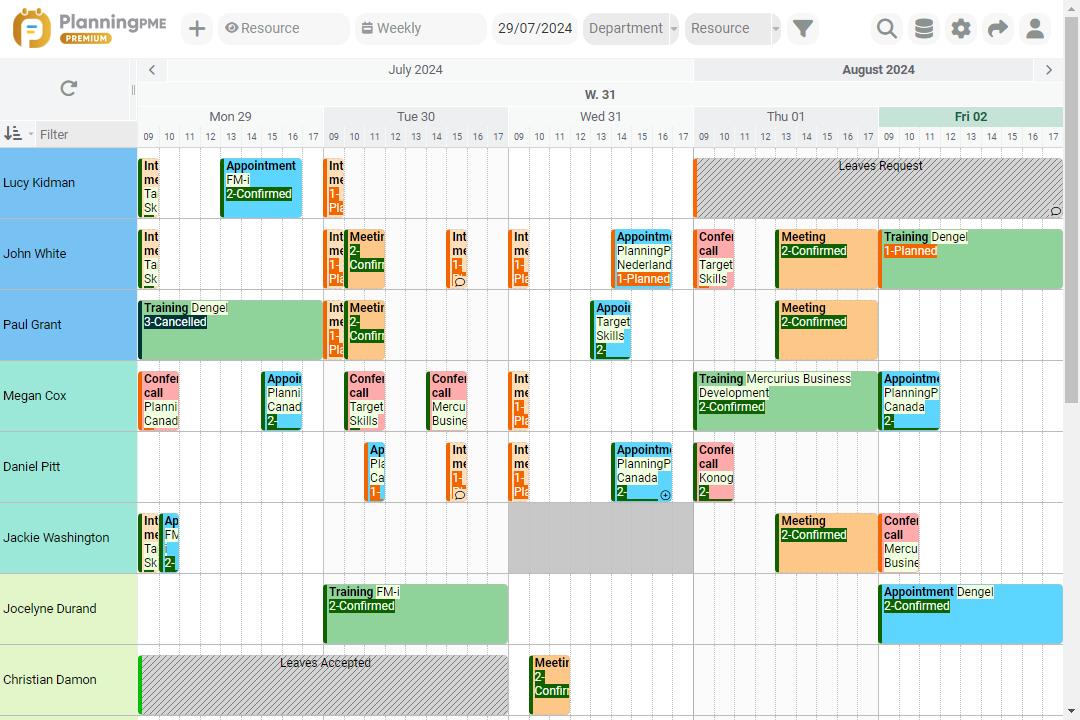
PlanningPME is designed to help you plan resources (staff and equipment) and activities on a shared calendar: ideal when you’re managing mediators, on-call services, group initiatives and field work. In practice, you can structure your schedule around three key elements:
- Human resources
Team of mediators, reception staff, and various coordinators
- Material resources
Vehicle fleet, rooms/spaces, and shared equipment
- Activities and task statuses
Examples of activities: on-duty shifts, support, IT workshops, transport mediation, meetings, training, travel time. Examples of task statuses for an operational view of the schedule: not started / in progress / completed / on hold / postponed
Comparison table: spreadsheet vs paper chart vs PlanningPME
| Criteria | Spreadsheet (Excel/Sheets) | On paper | PlanningPME |
|---|---|---|---|
| Real-time updates (multi-user) | Partial (need updates) | No | Yes |
| Multi-site drop-in centres / outreach services | Manual | Manual | Yes |
| Skills / Qualifications | Manual | No | Yes |
| Absences (holidays, sickness, time off in lieu, training) | Manual | Manual | Yes |
| Replacement staff in case of unexpected circumstances | Difficult | Difficult | Yes |
| Vehicles / equipment | Not suitable | No | Yes |
| Travel time | Manual | Manual | Yes |
| User access rights (managers, teams) | Limited | No | Yes |
| Exports & reporting (activity, volume) | Yes | No | Yes (including export to Excel) |
| Mobile/remote access | Partial | No | Yes (online) |
3 practical examples of how to use the schedule in your daily work
1) On-call duty: ensuring the service remains open despite staff absences
One morning, someone calls in sick. Without the right tools, we end up in “panic mode”: phone calls, messages, last-minute changes to Excel spreadsheets… and sometimes information doesn’t reach the right place in time.
With PlanningPME, the coordinator can see straight away :
- who is available during that time slot (and not already on the move or in a workshop)
- who has the necessary qualifications
- which services are critical (walk-in services, expected footfall, etc.)
Result : replacement staff found more rapidly, less stress, and continued service.
2) Mobile team: scheduling mediators, vehicles and travel times
When it comes to remote working, the real issue isn’t just ”who works”, but where they work, what they use, and for how long.
In PlanningPME, you can plan :
- field teams
- vehicles
- destinations (neighbourhood/town/reception point)
- travel as an activity in its own right
This way, you avoid errors in your schedule : : a vehicle is booked twice at the same time, or a workshop is scheduled for 2 pm without taking into account the 45-minute journey time.
3) Digital skills workshop & group activities: striking a balance between events and service user reception
Digital inclusion workshops and themed activities are essential… but they must not take up all the available time at the expense of receiving service users.
PlanningPME allows you to view the week with a clear overview of activities: :
- Reception/office hours
- Group workshops
- Individual support
- Time for coordination
Objective : To make sure that the workload is well distributed, workshops are maintained and the quality of service is consistent.
Set up PlanningPME without adding to your workload
- Identify the main categories of activities (reception, administrative procedures, digital skills services, transport, workshops, coordination, travelling).
- List relevant skills and qualifications (e.g. conflict prevention, work with specific public groups).
- Organise the work sites (fixed and mobile) using clear and consistent labels.
- Standardise absence labels (holidays, sick leave, time off in lieu, training) to ensure that the information on availability is reliable.
- Establish a routine: a weekly coordination meeting + a simple rule for changes (e.g. who approves, who informs).
Scheduling that protects the service… and the team
In social mediation, the aim is not simply to “tick boxes”. It means keeping our promise to be there for the service users: reception, guidance, support, and sometimes offering empathy. With a shared, structured schedule, you reduce mental workload, manage replacement staff more smoothly, and give greater visibility to those on the front line — exactly where service quality is determined.
Customers case studies - Testimonials
Testimonials

Discover the success story of our client Mairie de Bagneux
Bagneux Town Hall presents its organisation to easily manage the planning of agents in the town hall
Company Overview
Bagneux Town Hall
More than 800 agents
1 maintenance department with 200 staff
1 communication / public relation department managing 14 communal rooms
Our scheduling needs
Our main requirements in terms of planning management were:
1 - How to quickly identify available maintenance staff taking care of:
- maintenance of 10 schools with 3 or 4 different weekly slots and 5 agent profiles (assistant, maintenance staffing, catering agent, caretaker, group leader)
- cleaning and maintenance of communal buildings (town hall, theater, municipal health center, socio-cultural center, communal halls,...)
2 - Identify the periods of occupancy of the communal hall rooms in order to schedule cleaning services of the Maintenance Department/ Communal Buildings Maintenance Department.
Manage the town hall staff
PlanningPME provides us with a weekly and monthly view of the availability of staff in the department (Maintenance - 200 staff), enabling the administrative manager to better assess the need to reinforce a particular team.
If a site manager reports a staff shortage on a given day, PlanningPME allows you to see
if returns are expected in the short term (agents in training, missing personnel on an isolated day, …) and thus allows to advise on the priority tasks to accomplish while waiting for the return of the workforce or if the absences go spread over the week (illness, holidays…) and require the forecast of reinforcement.
The software also allows us to identify the personnel moved from one site to another to help. PlanningPME also show us to identify the number of available resources per site, per skill,…
In addition, PlanningPME by managing the occupation of the communal rooms allows us to schedule the intervention of the maintenance agents according to the free slots. On the other hand, it makes it possible to measure the number of hours of occupation of the rooms by the different requestors (associations, individuals, departments of the twon hall, individual society)
FAQ
Yes. You schedule shifts and ensure that the right skills are available during opening hours, whilst leaving room for the unexpected (replacement and/or extra staff).
Yes. You can schedule both staff and equipment within the same tool, which prevents reservation errors and simplifies the organisation of visits.
You can extract data and export it to Excel to consolidate key metrics (volume, task distribution, time spent per activity) and create your dashboards.
Yes. PlanningPME Web Access enables you to manage skills and assign specific tasks accordingly — useful for qualifications and sensitive tasks.